Are you a business looking to verify a Google Search Console (GSC) property? Verifying your GSC property is the first step to understanding how Google views your website. In this blog, we go over what Google Search Console is, its benefits, as well as the steps to verify your property.
What is Google Search Console?
GSC is a free website monitoring tool offered by Google that helps website owners and marketers understand, monitor, and improve their site’s presence in search results. With GSC, you can::
- Monitor your query performance in Google Search (in terms of clicks, impressions, average CTR, average position, etc.)
- Monitor your performance on Google Discover
- See whether google is indexing your pages and videos
- Monitor user experience on mobile and desktop
- See whether your pages are passing Core Web Vitals standards
- Submit sitemaps and individual URLs for crawling
- Manage security issues and manual actions
- Monitor and resolve common issues with schema markup and code (such as structured data errors)
Why You Should Verify Your Google Search Console Property
Verification confirms that you own or manage the website, allowing you to access valuable insights. Google Search Console can be a powerful tool for business owners and marketers. Benefits include:
- Understanding how Google views your website
- Identifying indexing issues and SEO opportunities
- Monitoring website performance to inform content and technical strategy
- Receiving notifications for manual actions or security issues
This information can help you better optimize your site, be a stepping stone for developing SEO strategies, and help troubleshoot any issues that may arise.
How To Verify a Google Search Console Property
Verifying a Google Search Console property is a relatively easy process but choosing the right method depends on your website setup. If you are looking to verify your site, follow these steps:
Step 1: Add Your Property
After navigating to the Google Search Console website, you have two property types to choose from:
- Domain: A domain property covers all URLs across all protocols and subdomains of your site, including http, https, www, non-www, and any subdomains. Verification for a domain property is done through a DNS record at your domain registrar. This type of property is recommended if you want complete coverage of your entire website.
- URL Prefix: A URL prefix property covers only the URLs that match the exact prefix you enter, such as https://www.example.com. URL Prefix properties can be verified using an HTML file, an HTML tag, Google Analytics, or Google Tag Manager. This option is useful if you only want to track a specific version of your site.
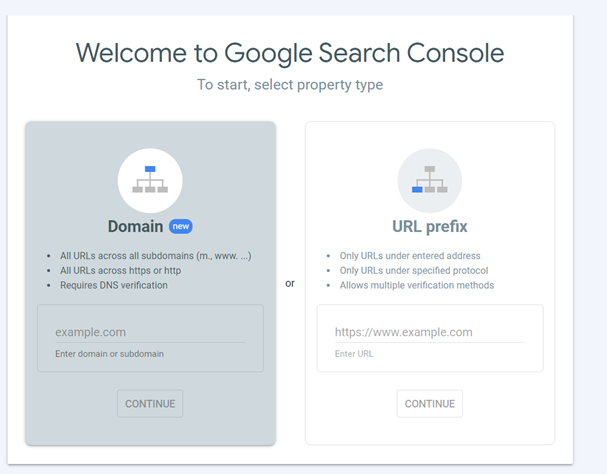
Step 2: Choose 1 of 5 Verification Methods
After submitting a URL or Domain, the Verify Ownership Window will pop up.
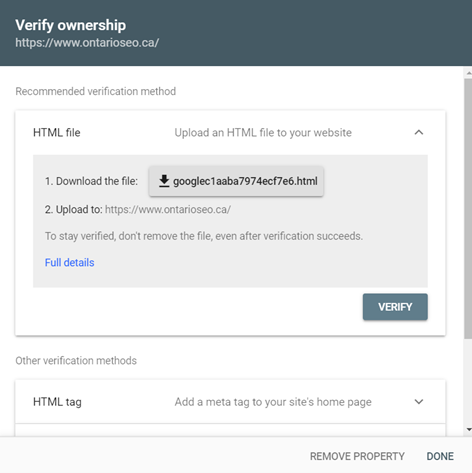
Here, you will need to choose at least one of the five methods below to verify your property (you can use multiple methods if you wish):
- HTML File Upload
- HTML Tag
- Google Analytics
- Google Tag Manager
- Domain Name Provider
1. HTML File Upload
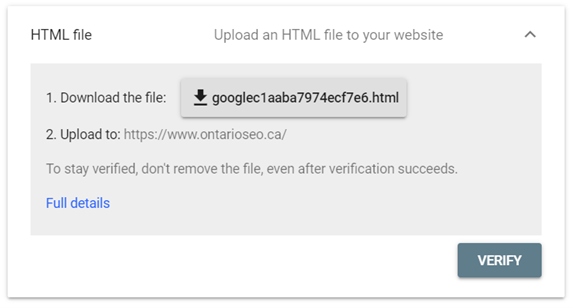
This is Google’s recommended verification method. For this method to work, you will need to download the HTML file provided and upload it to the root directory of your site. Keep in mind that this method may not be possible on certain site hosting platforms. Once you have uploaded the file to your site, click verify.
2. HTML Tag
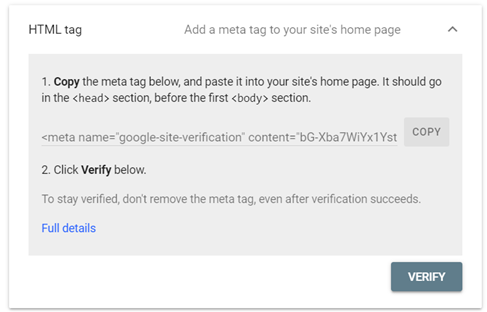
For this verification method, you will need to copy the meta tag provided and paste it onto your site’s home page in the <head> section, before the first <body> section. Once you have added the tag, click verify.
3. Google Analytics
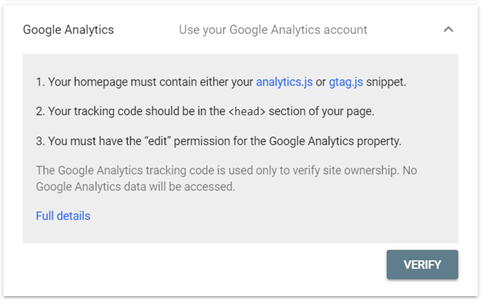
If you already have a Google Analytics (GA4) account, this may be the easiest way to verify your GSC property. For this method to work, Google will need to verify that your site contains either an analytics.js or gtag.js snippet (which should be in the <head> of your website) and that your Google account has edit permissions for the Google Analytics account. If you do have this snippet of code on your site, click verify.
4. Google Tag Manager
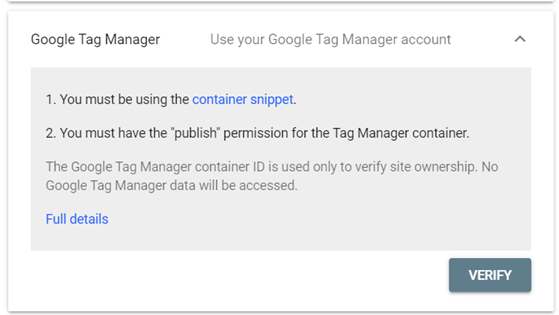
This is another potentially easy property verification method if you already have a Google Tag Manager (GTM) account. For this method to work, you will need to be using the GTM container snippet and the Google account you are using must have publish permissions for the container. If you do have this snippet, click verify.
5. Domain Name Provider
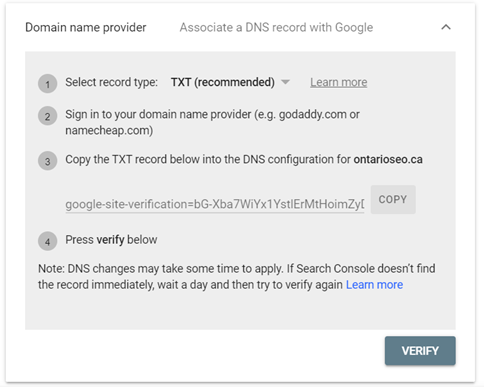
This is the most complex way to verify a GSC property. First, you will need to select a record type, sign in to your DNS provider, copy the record provided, add it to your domain’s DNS configuration, and then click the verify button. It’s important to understand that DNS changes may take several hours to propagate.
Step 3: Property Verification & Troubleshooting
Once you have clicked the verify button for whichever method you chose, you should receive a confirmation message that the property has been verified. If this is the first time your site has been added to Google Search Console, it could take a few days for your site data to show up.
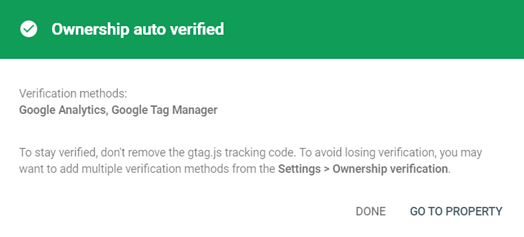
If verification failed, you will want to troubleshoot for the following issues:
- The file was not uploaded to the right location
- Your verification file has the wrong content
- Your verification file might have been hacked
- Your verification file redirects to a disallowed location
After checking these issues, double-check the method instructions and ensure that no conflicting meta tags or files exist. If problems persist, consider using a different verification method.
Best Practices After Google Search Console Verification
Once your site is verified, following these best practices will help you make the most of the data and keep your website healthy:
- Submit sitemaps and important URLs to accelerate indexing
- Monitor search performance regularly to spot sudden dips or spikes in traffic and identify opportunities
- Use GSC insights to guide content updates and SEO improvements
- Set up email alerts for security issues and manual actions
How Foundery Can Help
If verifying your Google Search Console property feels overwhelming or you want to make sure it’s done correctly the first time, Foundery can help. Our team of SEO experts will handle the verification process for you and make sense of the data to drive meaningful results. From monitoring performance trends and troubleshooting indexing issues to identifying content opportunities and optimizing technical SEO, Foundery ensures your website is set up for long-term success.
Need assistance verifying your search console property? Get in touch with experts at Foundery today.