
Paid Media budgets are working harder than ever. For marketing leaders managing quarterly budgets, bid modifiers provide a structured way to invest more heavily in high-performing regions or audience segments without increasing overall Paid Media spend.
What Are Bid Modifiers?
Bid modifiers are a component of Google Ads’ bidding model that adjust your base bids to reflect the value of specific audiences, locations, devices, and more. You can increase or decrease bids based on these factors:
- Location
- Device
- Audience segments
- Time of day
- Content
- Age
- Gender
- Household income
When Can Bid Modifiers be Applied?
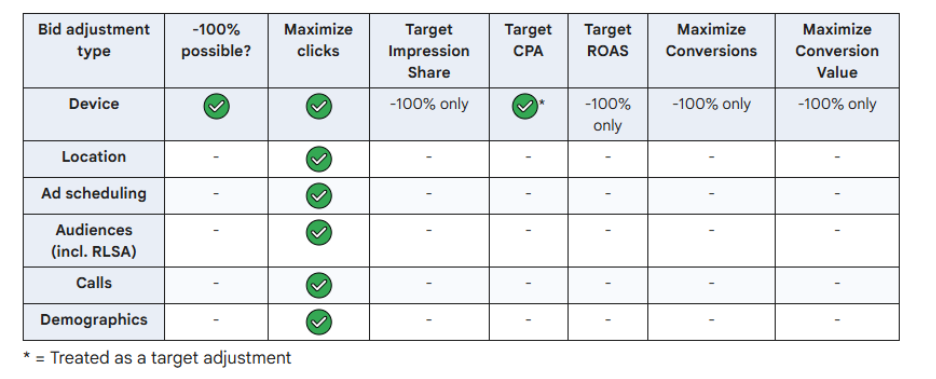
Bid modifiers are useful in non-Smart Bidding campaigns in Google Ads. This means that Maximize Conversions, Maximize Conversion Value, Target CPA, and Target ROAS campaigns do not apply bid modifiers. Bid adjustments on devices are the only modifiers that can be applied to all Smart Bidding strategies but only when set to -100% (excluding them from campaigns). Target CPA campaigns that use device adjustments will instead treat the modifiers as target adjustments rather than a bid adjustment. Maximize Clicks campaigns can use device bid modifiers normally.
Why Use Bid Modifiers?
Bid modifiers increase control over budget allocation. Once you analyze campaign patterns in your account, bid modifiers allow you to:
- Adjust bids quickly to respond to market shifts.
- Prioritize campaign elements that perform consistently.
- Allocate spend towards audiences that matter most to your objectives.
How Do They Work?
When an ad request matches your targeting criteria:
- Google multiplies your base bid price by the set bid modifier(s).
- If multiple dimensions apply, modifiers are combined.
- The final bid does not exceed the max bid price.
Example:
You observe that zip code A performs better than zip code B and C. Zip code C performs the worst. In your campaign you can assign a percentage based positive bid modifier to zip code A and a negative bid modifier to zip code C. Since all modifiers start at 100% the new bids per zip code could look like this:
- Zip code A: 150% (by adding a 50% modifier)
- Zip code C: 50% (by adding a -50% modifier)
- Any other zip code: 100% until adjusted.
The campaign now allocates more budget to zip code A and reduces spend in zip code C based on past performance.
Bid modifier adjustments range from -100% to +900%
Bid Modifier Types and Automated Strategies
To help visualize how bid modifiers work, here’s a chart outlining the different types of bid adjustments and which automated bid strategies can use them. This makes it easier to see how Paid Media campaigns on Google Ads can optimize spend across audiences, locations, devices, and more.
Best Practices for Success
- Analyze performance before applying modifiers.
- Apply higher multipliers to proven segments.
- Monitor and adjust. Optimization is an ongoing process, and results should be reviewed regularly.
- Bid modifiers stack. If multiple positive adjustments apply, spend can increase faster than expected. When multiple adjustments apply, Google multiplies them together before applying the result to your base bid.
The Bottom Line
Bid modifiers give marketing leaders greater control over budget allocation and performance efficiency across Paid Media campaigns. See the charts at the bottom of the page to see how each campaign type treats bid modifiers.
Want more control over your Paid Media performance?